Eat with clarityFind your rhythmAsk SageKeep care close
ONE APP. THE EVERYDAY ESSENTIALS.
Less scattered. More connected.
Your meal log tells one part of the story. Your habits and health history tell the rest. Keep them close, in a way that makes sense to you.
NUTRITION & MEAL PLANNING
Real food. Your kind of everyday.
A calorie tracker and meal planner for real life. Log a meal from a photo, barcode or search, then plan what comes next with recipes and the ingredients in your kitchen.
From the first meal you record to the questions you bring to an appointment. Explore the details behind the app.
01
Food logging & nutrition
Use a meal photo, your gallery, a barcode or food search. Review portions, calories and macros before saving. Keep daily, weekly and monthly nutrition reports together.
Choose a food style, set preferences and list what you have. Start with stored recipes, check ingredients and preparation steps, and swap an option when it does not suit you. Asking Sage for AI ideas is optional.
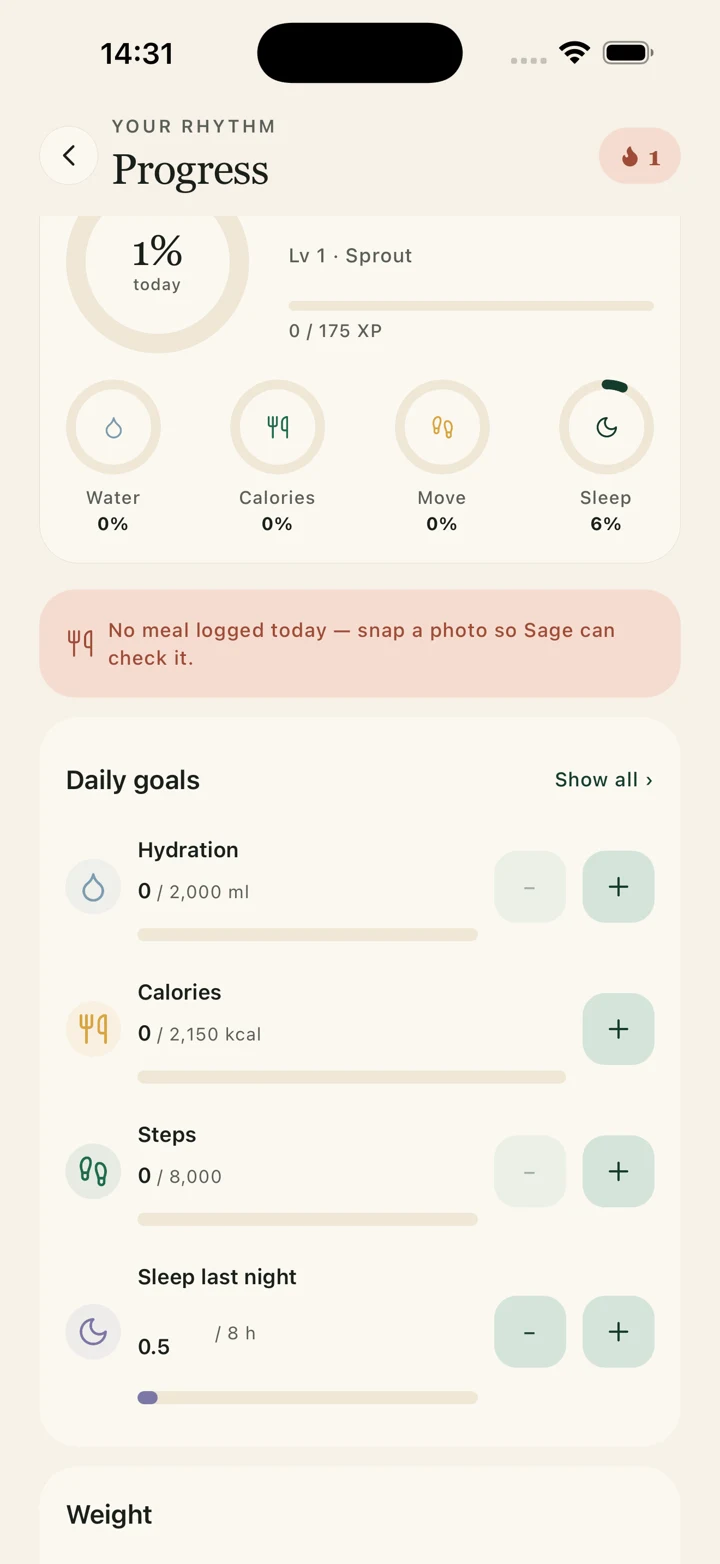
Record water, steps and sleep with direct controls. Correct an accidental entry, follow weight changes, adjust daily goals and review your recorded trends.
Ask questions in your own words, use voice input and attach a photo or document. Find previous conversations, review remembered health information or choose an incognito conversation.
Keep conditions, allergies, medications, supplements, family history and documents in your profile. Review what is recorded and choose the categories a professional can see.
Explore physicians, therapists, dietitians and nearby care. Check appointment options and use messaging, audio or video tools where available. Professionals have patient, calendar and appointment views.
Record mood, stress and sleep quality, try guided breathing, and keep optional cycle or pregnancy records. Review your own check-ins without turning them into a medical diagnosis.
Start with a daily digest, review your saved health assessment and keep reminders in view. Follow your activity level and recorded progress as you build a routine that fits.
Choose your language, keep food-style preferences separate and review health memory or sharing settings. Manage your profile, subscription and account options from one place.
A professional workspace brings patient context, appointments, working hours, messages and earnings views together. Consultation availability, fees and eligibility depend on the professional and region.
Organisation programmes are available for discussion. Integrations, reporting, clinical responsibilities and rollout terms are agreed during pilot planning.
SIMPLE PLANS. YOUR PACE.
A little care is free. There’s room for more.
Start with everyday tools. Choose Plus when you want higher allowances and more support from Sage.
Talk with Sage, keep track of food and daily habits, organise health records and explore professional profiles. LifePack brings the everyday parts of looking after yourself into one place.
How can I get the iOS or Android app?
Contact reach@lifepack.io for the current mobile access options. Availability and features may vary by platform, region and release. Web sign in is available separately.
Can an organisation use LifePack?
Employers, insurers, hospitals and clinics can discuss a focused pilot with our team. Integrations, reporting, privacy, clinical responsibilities and commercial terms are assessed before rollout.
Is Sage a doctor?
Sage is an AI companion for information and guidance. It cannot diagnose you or replace a qualified clinician. For an emergency, contact your local emergency services.
Can I start for free?
Yes. The free plan includes daily tracking, reminders and Sage and meal scan allowances. Plus adds higher allowances, help understanding lab reports and personalised meal planning. USD prices are $2.99 weekly, $4.99 monthly, $29.99 yearly. Your store shows the final local price, taxes and available options before purchase. Professional consultations are charged separately.
Which languages does Sage speak?
English, Turkish, French, Arabic, Yoruba, Igbo, Hausa and Nigerian Pidgin. Choose the language you are most comfortable using.
What information can a doctor see?
You choose the health categories you share in your profile permissions. A clinician you consult can view the information you have approved, helping you explain your history with less repetition.
How do I log food from a photo?
Photograph the whole meal, review the identified ingredients and portions, then save your entry. Photo-based nutrition values are estimates, so correct anything that does not match what you ate. Read the guide
Can I make a meal plan using food I already have?
Choose pantry mode and list the foods you have. Normal planning uses a stored recipe library and keeps your ingredient list as the available foods. If a suitable option cannot be made from them, the planner shows a shortfall. Asking Sage for AI ideas is optional. Read the guide
Can I track water, steps and sleep together?
The Progress screen brings daily habits together. Keep recorded amounts separate from your targets, and correct accidental entries before reviewing the day. Read the guide
What should I check in a nutrition report?
Start with the date range and recorded-day count. Review the meals behind the calorie and macro totals, and keep missing records distinct from intentionally low entries. Read the guide
YOUR EVERYDAY, A LITTLE MORE TOGETHER.
Make room for you.
Meet LifePack on mobile. Ask our team about the current iOS and Android access options.